
10 Best Digital Wallets to Save You Time, Money, and Stress

Some products in this article are from our partners. Read our Advertiser Discloser.
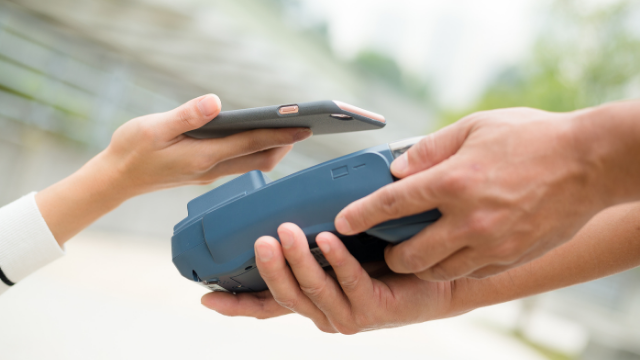
Digital wallets are becoming an increasingly popular alternative to cash or using a debit or credit card to make payments. But what are the best digital wallets and which one is right for you?
As you consider which option to use, it’s important to evaluate the features and fees of today’s most popular digital wallets so you can choose the solution that best suits your needs.
Table of Contents
Top Digital Wallets
More people are abandoning cash and making their purchases digitally since this payment option is convenient and secure.
Digital wallets give you the freedom to make payments at retailers without carrying a physical wallet with you. Some options also allow you to send money to or receive money from loved ones.
Better yet, they can be more secure than carrying cash or using a debit or credit card.
But which digital wallet should you use? Here are ten of the best options currently available.
1. Google Pay
Google Pay works in over 40 countries and uses near-field communication (NFC) technology to enable payments.
One great feature of Google Pay is that it allows you to deposit funds into your digital wallet or make purchases by adding a debit card, credit card, PayPal account, or bank account number.
It’s important to note that bank account access isn’t available in all countries. Other payment methods may be available, depending on your location. See the Google Pay website for more details.
You can make purchases at participating in-person or online retailers. Sending money to family and friends using Google Pay is also an option.
Additionally, Google Pay allows you to view your spending habits and identify areas where you can save money by syncing your accounts. This can help you keep track of your financial health more easily.
2. Venmo
Venmo is one of the most popular digital wallets and is a subsidiary of PayPal. The app utilizes bank-grade security and encryption to safeguard your information.
Venmo allows you to shop online or in person and pay for purchases at participating retailers. It also allows you to request payments for services you provide, as well as receive money from or send money to family and friends.
You can pay right from your Venmo account by connecting your bank account, debit card, or credit card. It’s also possible to use QR codes to make sure you send money to the right person and allow the app to make calculations for you when splitting bills between multiple people.
Additionally, you can have your paychecks directly deposited into your Venmo account. Your paycheck may even appear two days faster than it would if you deposited it into your regular bank account.
3. Apple Pay
Apple Pay is another excellent digital payment method, as it also utilizes a DPAN to protect your account information.
Some stores that use Apple Pay:
- Albertsons
- Best Buy
- Costco
- Disney
- GameStop
- Nike
- Starbucks
Every transaction you make with Apple Pay is secure and private, making it a safe way to complete purchases. You can use this digital wallet to purchase items in stores, pay for many public transit sources, send money to family and friends, and more.
Money can be stored directly in your Apple Pay account, or you can link a debit or credit card to make payments.
4. Cash App
Cash App works with debit and all major credit cards. You can send and receive money from other users or donate to your favorite causes.
When making payments, keep in mind that merchants and charities must be partnered with Cash App for you to use it.
You can receive your paycheck and other direct deposits, such as tax returns, up to two days early by signing up for direct deposit using your Cash App routing and account number.
If you want to convert your money to Bitcoin, Cash App offers a feature to help with this. The app also features an investing option that allows you to purchase shares of stock for as little as $1.
Learn More: Cash App Review
5. PayPal
One of the first digital wallets available was PayPal. It offers services in over 25 currencies throughout the world. PayPal keeps your financial information safe by using encryption technology and 24/7 monitoring.
You can use PayPal for both online and in-person shopping. It’s easy to send and receive money via PayPal to and from loved ones. Sending invoices to others when you sell products or services is also an option.
PayPal accepts all major credit cards as supported payment methods. You can also pay by connecting your bank account.
A tracking feature is available to help you record all of your expenses when you buy items using PayPal. You can also see all the money you’ve received from others who have sent you money through PayPal.
6. Zelle
Zelle is a digital payment solution that allows you to pay friends and family. Payments are sent quickly, so your recipient doesn’t have to wait for their money to arrive.
Zelle allows you to send money to or receive money from other individuals who are also signed up for the service. It uses your bank account information to complete transfers. If your bank isn’t a Zelle partner, you can still transfer money using the Zelle app, available for both Android and iOS devices.
One cool feature is that Zelle transactions are completed in just a few minutes. It’s important to only use Zelle with people you trust. This is because you can’t get money back once you send it through Zelle.
For example, it may not be wise to use Zelle when buying and selling on Craigslist and similar platforms. Depending on the bank, you may run into daily and monthly transfer limits with Zelle.
7. Walmart Pay
For individuals seeking a digital payment option, they can use Walmart Pay at Walmart. It utilizes verified payment methods and is encrypted using SSL technology to ensure your information remains secure.
The goal of Walmart Pay is to make it faster and easier to buy things at Walmart. When you are ready to pay, scan your phone over the QR code displayed on the checkout PIN pad.
Your credit card information (including your CVV code) is stored with Walmart Pay. Walmart employs multiple layers of security and continually monitors its systems to prevent hackers and fraudsters.
It’s easy to add credit cards and Walmart gift cards to your Walmart Pay account. Unfortunately, you cannot use your bank account with this digital wallet.
8. Dwolla
Dwolla is a digital payment solution that lets you send or receive money to or from anyone who also uses the platform.
It doesn’t connect with your debit and credit cards. Instead, it transfers money directly to and from your bank account using the ACH system. You are identified by your Dwolla ID, email address, or cell phone number. Dwolla will not share your bank information.
One benefit of Dwolla is that it’s cheaper than digital wallets like PayPal if you plan on receiving money for selling goods or services. PayPal charges you 2.9% plus 30 cents, but Dwolla only charges you 25 cents for transactions of $10 and over.
9. Facebook Pay
Facebook Pay is a digital wallet that enables users to make payments to people through Facebook, Messenger, WhatsApp, and Instagram. It prioritizes security by ensuring your payment information is not shared with buyers, sellers, or merchants.
All payment data is stored separately from your other Facebook account information. You have to have a Facebook account to use Facebook Pay. With Facebook Pay, you can send or receive payment for items sold on Marketplace.
You can also use Facebook Pay to send money directly to loved ones or donate to fundraisers on Facebook or Instagram. Facebook Pay can send payments using your debit card, credit card, or PayPal account.
10. Amazon Pay
Amazon Pay enables Amazon account holders to make payments for transactions through Amazon and thousands of other websites. You can use Amazon Pay at any participating retailer that accepts it as a payment method.
When you use this digital wallet, you can select almost any payment option you have listed in your account. It’s important to note that you can’t use an Amazon gift card balance when paying with Amazon Pay. This digital payment solution is just a go-between for you and retailers.
Be aware that Amazon Pay may share the last four digits of your credit card or other information with merchants.
When you pay using Amazon Pay, your eligible purchases are covered by Amazon’s A to Z Guarantee. However, all other questions regarding your transactions must be directed to the merchant.
FAQs About Digital Wallets
Digital wallets are becoming very popular, yet you might still have questions. Here’s a look at some of the most frequently asked questions.
What types of payment methods can be stored in a digital wallet?
Digital wallets can store a variety of payment methods, including credit and debit cards, bank accounts, and mobile payment methods such as Apple Pay or Google Pay. Additionally, digital wallets can store cryptocurrency.
Are there any fees associated with using a digital wallet?
Some digital wallet providers may charge fees for certain transactions or services, such as foreign currency exchange or overdraft protection. It is important to review the terms and conditions of a digital wallet provider to understand any fees associated with its use.
Can a digital wallet be used internationally?
Many digital wallets can be used internationally, but it is important to check with the digital wallet provider to understand any fees or limitations that may apply.
How do I set up a digital wallet?
To set up a digital wallet, you will need to download a digital wallet app or create an account with a digital wallet provider. Then, you can add your payment and personal information to the digital wallet.
Summary
There is a wide variety of digital wallets available to meet all your money-sending and receiving needs. The best digital wallet for you depends on your needs. You can use several of these payment solutions. There’s no reason to limit yourself to just one. Try some of these options and see which solutions work best for you.
Recommended Reading