

Boldin Review: Retirement Planning Software

Some products in this article are from our partners. Read our Advertiser Discloser.


It can be challenging to figure out how much to save for retirement. Starting to save as soon as possible increases your chances of achieving your retirement goals. Boldin helps you build a customized retirement strategy for free. Premium tools are also available for in-depth planning and personalized support.
This Boldin review can help you decide if this is the retirement planning tool to improve your savings strategy. We’re trying out the features so you can get a firsthand look.

Overall Rating
Summary
Boldin offers free retirement planning tools that will satisfy most users. The premium plan and financial advisor packages provide personalized support.
-
Ease of use
4
-
Features
5
-
Reports
4
-
Cost
5
-
Customer support
4
Pros
- Mostly free
- Quick setup
- In-depth retirement tools
Cons
- Limited account syncing
- Basic monthly budget tools
- Tracking limitations
Table of Contents
What is Boldin?
Boldin provides free and paid retirement planning tools with more insight than your broker’s retirement calculator.
Some of the Boldin features include:
- Customizable retirement planner
- Personalized coaching suggestions
- Detailed graphs and charts
- Net worth tracker
- Financial advisor packages
- Market Risk Explorer
- Debt Payoff Explorer
- View Full Plan Net Worth Snapshot
- Model a Social Security Reduction
- Risk Tolerance Survey
Completing a basic questionnaire to project your retirement progress takes less than ten minutes. After the initial review, you can customize your responses to fine-tune your plan.
The retirement planner is more like a budgeting app than an investment tracking app like Empower. However, Boldin doesn’t link to financial accounts unless you upgrade to the paid PlannerPlus version.
The one-on-one financial advisor sessions also require a purchase. That said, most platforms offer a “forever free” membership.
New features include the View Full Plan. This is available in all plans. You will see a snapshot of your net worth today as well as your projected net worth at your longevity age. It allows you to download the view, which is a great feature to share.

The Social Security model feature is also new. Social Security is an important part of many retirement plans, and while the program may change over time, it is expected to continue providing benefits. This app helps you track your estimated benefits and keeps you informed with notifications about important updates that may affect your retirement planning.
If you are concerned about future risks, the new risk tolerance survey is very helpful. Your retirement plan is only as accurate as the assumptions behind it, so if your expected investment returns or risk level don’t match your real-life strategy, your projections may not reflect reality. The Risk Profile helps you compare your plan assumptions with your personal situation and provides a great starting point for a conversation with a Boldin Advisor.
Who Should Use Boldin?
The free platform is a good option for anyone unsure whether they are saving enough for retirement. You should also consider this platform if you want a customizable retirement planner.
Upgrading to the Boldin PlannerPlus includes real-time net worth tracking and money simulators. You can get personalized suggestions and hire an on-demand financial advisor for one-on-one planning sessions.
Is Boldin Safe?
Boldin protects your data with bank-level security. The company uses a third-party service (Plaid) to connect to bank and brokerage accounts without storing the information on its server.
You also won’t get annoying phone calls encouraging you to upgrade to the paid version, like you will with other companies. If you only want to use the free version, you can do so hassle-free.
Boldin Pricing
Boldin offers four pricing options, ranging from free to $999 annually. Here’s a breakdown of each option.
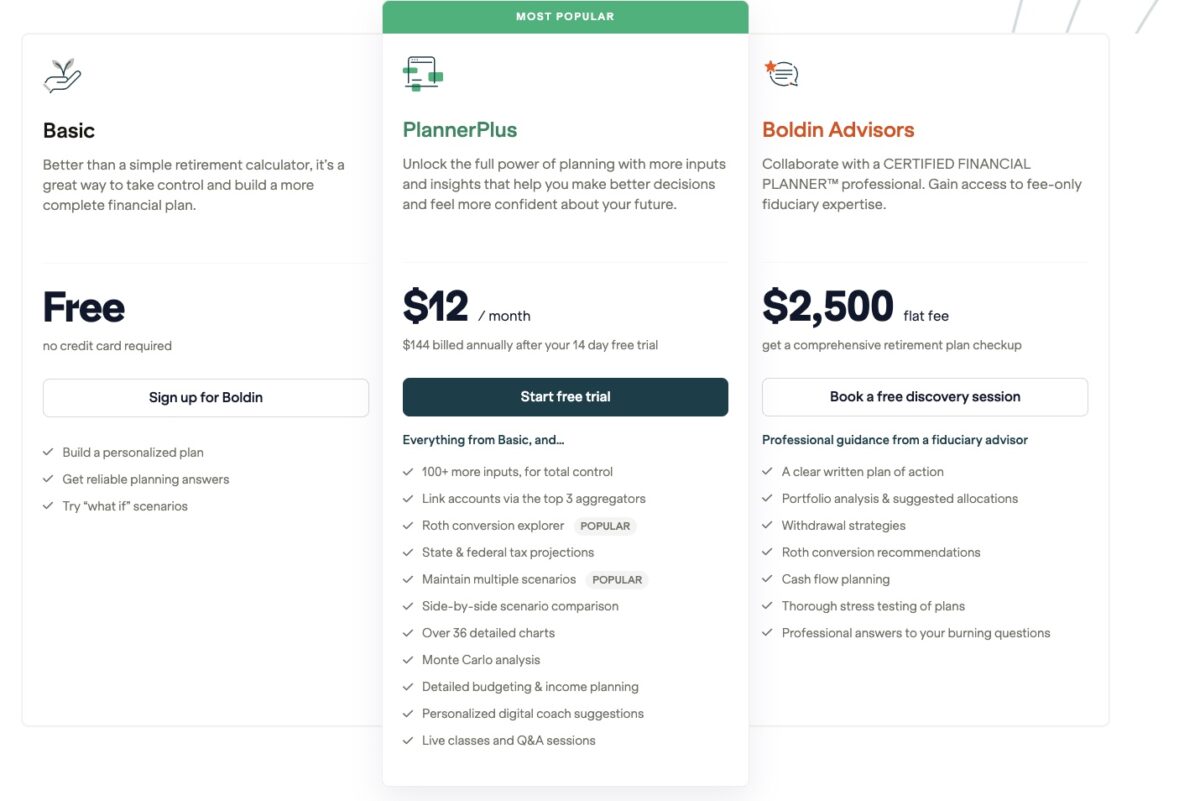
Basic
Annual cost: $0
The default account option is the Basic level. This tier is free, and you aren’t obligated to pay for any services unless you want access to additional features.
Free retirement planning tools include:
- Interactive retirement calculator
- Coaching suggestions
- Online Facebook group community
This plan doesn’t link to financial accounts or track your net worth in real-time.
However, it lets you quickly project how much money you can have in retirement and what steps you can take to improve your odds of success. You can also update your financial metrics and see the potential impact.
All new members start with the free planner. You can see how much information this membership plan provides and decide if you want to upgrade for full functionality.
I personally think this plan is sufficient if you want a rough idea of your current progress. However, being unable to tailor your assumptions to the various factors can be mildly frustrating. For example, I own an investment property and need the paid version to record this.
PlannerPlus
Annual cost: $144
The PlannerPlus tier has a 14-day free trial and costs $144 per year ($12 a month, billed annually).
Upgrading unlocks more interactive features, including:
- Links to bank and investment accounts
- Budgeting tool (over 75 categories)
- Create customizable scenarios
- Add optimistic and pessimistic assumptions
- State-specific tax calculators
- Medicare simulators
- Real estate tracker
- Roth conversion modeling
- Printable and downloadable reports
- “What if” scenarios
- View projections in either Today’s Dollars or Future Dollars
PlannerPlus doesn’t provide access to a human financial advisor. However, the advanced planning tools and simulators can answer most of your questions.
PlannerPlus users can now:
- Bring together holdings across 401(k)s, IRAs, brokerage accounts, and other investment accounts modeled in Boldin
- See their overall asset allocation across accounts
- Complete a Risk Tolerance Survey to create a personalized Risk Profile and target allocation
- Compare their actual portfolio with that target
Live Q&A sessions also help you navigate the planning process. The webinar host can answer your questions as you improve your plan.
Choose this plan to monitor your bank and financial accounts in real time. The service can track your net worth and account balances.
Boldin Advisor
Annual cost: Varies ($1,650 average)
You get access to a Certified Financial Planner (CFP) with the Advisor tier.
The cost varies depending on the number of online planning sessions you request. The typical user spends $1,650 per year on advisory services.
It’s possible to start with a free discovery session to decide if this service is beneficial. If so, you pay a flat fee rather than a percentage, as most advisors do.
The plan includes:
- Discovery call: Free session to discuss your financial goals
- Plan overview: Initial consult to review and agree on your plan’s data points and assumptions
- Plan of action: The CFP creates a personalized financial plan
- Annual check-in meeting: A yearly review of the plan’s progress and to make changes
- Ongoing support: Unlimited advisor access for advice on different retirement topics
The service recommends this plan if you’re within five years of retirement or seeking advice on a pending financial decision. It’s the only pricing tier to offer personalized financial planning sessions.
What Features Does Boldin Offer?
Here are several of the virtual advisor tools the platform offers.

Retirement Planner
The customizable retirement planner tool is the cornerstone of Boldin. It covers multiple financial factors that affect your retirement strategy, whether you plan to retire early or later in life.
It takes approximately ten minutes to make a basic plan. Then, you can add extra information on the “My Plan” menu. You can add and modify your details later, as needed. This flexibility is helpful if you don’t have all the answers or discover overlooked areas during setup.
The projections are displayed as a chart on your account dashboard. This chart projects your savings progress during your working years and annual retirement drawdowns.
The planner requests information for these topics:
- Current age
- Income
- Expenses
- Savings balance
- Housing costs and home equity value
- Medical expenses
- Retirement benefits
- Estate planning
Overall, the planner is easy to use. Here is a look at the most influential factors.
Work and Other Income
This section calculates your annual earned income and passive income streams. The tool can also ask where you plan to save your excess earnings after paying your monthly bills. Premium subscribers can view annual salary increases with both optimistic and pessimistic projections.
Expenses and Inflation
The free version only asks for your total monthly expenses, large one-time expenses, and non-mortgage debts. This calculation quickly compares your income to expenses to project your cash flow and net worth.
PlannerPlus offers an in-depth budgeting tool, but you must manually enter your expenses across 75+ categories. You will need to use a full-fledged budgeting app to track your actual spending against your monthly budget.
Paid subscribers can also use an inflation calculator to see how rising prices can potentially reduce their spending power in retirement. This tool can be especially helpful with the recent bout of generational high inflation.
There is a separate section for listing current debt payments. You can erase these as you get out of debt.
Savings and Assets
Users on the Planner tier can manually add the balances of their bank and investment accounts, including IRAs and 401(k)s. They can also add the value of tangible assets, such as vehicles.
Paid subscribers can link to their financial accounts for effortless tracking. Boldin uses this information to calculate your liquid net worth and project future tax situations.
Premium users can add these details as well:
- Estimated annual return per account
- Tax treatment of investment gains
- Roth conversion calculator
Listing your current savings balance and savings rate makes it easier to estimate the size of your future nest egg for liquid assets and alternative investments.
Social Security
You can calculate your Social Security benefits. PlannerPlus subscribers can also use a cost-of-living calculator.
The Social Security Explorer tool can run several scenarios to choose the best age to start drawing benefits. You can also see how this stipend fits into your overall strategy for affording expenses.
Annuities and Pension
Users can add annuity and pension details, including the benefit amount, cost-of-living adjustment, and survivor benefits. The service can track monthly pensions and lump-sum pensions.
If you don’t have an annuity yet, Boldin offers a free consultation to determine if you’re an ideal candidate for this account.
Withdrawals
How much of your retirement savings you withdraw each year can be as important as saving for your golden years.
You can compare several withdrawal strategies based on the following:
- Spending needs
- Maximum spending
- Fixed percentage withdrawals
Only the spending needs strategy is available for free.
You can upgrade to access the fixed percentage withdrawal strategy if you want to follow the 4% rule. PlannerPlus subscribers can also model transfers between accounts and see the impact on future withdrawals.
Home and Real Estate
Your housing costs are another critical factor in estimating retirement costs. One onboarding question is whether you own or rent your primary residence and what your current monthly payment is.
You can also include your current home equity for your primary residence with the Basic plan. Upgrading is necessary to track second homes, investment properties, and project future sales or acquisitions.
PlannerPlus features include:
- Track multiple real estate properties
- Model future real estate purchases and sales
- Simulate mortgage refinancing or relocating
- Calculate property value appreciation
Run “what if” scenarios to forecast buying, selling, and refinancing properties.
Medical
All users can enter current medical insurance premiums and projected medical and long-term care expenses in retirement.
Premium members can perform these functions:
- Estimate Medicare expenses
- Long-term care planning
- Project medical treatment price inflation
It can be challenging to pinpoint medical costs during your retirement years when it’s still several decades away. I appreciate the general assumptions and customizable scenarios to draft a realistic plan and progress assessment.
For example, free users can choose which Medicare plan to use. They can also choose how they plan to pay for long-term care, such as through a specialty insurance policy or by relying on a relative.
“What If” Scenarios
The “what if” simulator can be one of the most valuable tools, as you can change many variables to estimate the potential impact on your retirement finances.
Some examples can include:
- Paying off debt or investing your extra income
- Early retirement vs. working until the standard age
- Estate planning
- The financial impact of relocating
- Switching the asset allocation of investments
- Roth conversions
Considering several possibilities during the planning process can help you choose the best course of action. Running these scenarios can also identify potential weak spots that may hinder your ability to achieve your goals.
Insights
Inputting your information helps Boldin project your savings progress. The results are displayed in several colorful graphs and charts.
These charts measure these topics:
- Projected age when savings will run out
- Total savings needed per year
- Planned income and expenses
- Net worth forecast
- Retirement withdrawals by account type
The free charts make it easy to determine if you will likely outlive your savings. If the service projects a deficit, you may need to contribute more to a retirement account.
Premium subscribers can see advanced charts that analyze specific accounts and project estimated taxes using the PlannerPlus Inspector tool.
Monte Carlo Analysis
Paid users may enjoy the Monte Carlo simulator. This tool runs 1,000 scenarios using different assumptions about investment returns, inflation, and earned income to estimate the probability of having enough money for retirement.
This analysis tool provides a more in-depth look at optimistic and pessimistic scenarios than the free insights.
Financial planners typically run this analysis when making a financial plan. With Boldin, you can gain similar insights on your own at an affordable cost.
Improved Retirement Planning
Most retirement planning tools only calculate your current progress and recommend how much you should save each month to achieve your goals.
Boldin offers several virtual coaching options to provide personalized guidance.
Strengthen Your Plan
The Strengthen Your Plan tool is an online education center for different financial and retirement topics.
Some of the topics include:
- Increasing savings rate
- Maximizing Social Security benefits
- Minimizing tax liabilities
- Opening a health savings account
- Preparing for known and unknown risks
Boldin recommends relevant articles, strategies, and calculators throughout the platform.
These topics can strengthen your finances, helping you avoid outliving your cash reserves and prepare for unexpected expenses and risks.
Coach Suggestions
The automated coaching tool looks for gaps in your current strategy. You will see suggestions to add more details for the service to assess your actual financial situation.
After entering accurate information, the coaching tool may recommend additional steps. Paid subscribers will have access to more recommendations.
Your retirement score increases as you complete open suggestions and as your savings trajectory improves. This score is visible on the main dashboard and other pages.
Communities
All free and premium members can join the Boldin Facebook group. This online community lets users interact with one another to discuss the platform and broader finance topics.
Expert Help
Users can order a one-on-one session with a planning coach to make sure their plan is set up correctly. You pay $175; this isn’t a substitute for financial planning, but it can provide peace of mind and help remove errors and omissions.
The live Q&A sessions for free and paid members are also helpful for receiving detailed insights to improve your plan and financial knowledge.
Customer Support
You can get technical support by email and live chat. Note that live chat responses can take several hours. Boldin offers an “Office Hours” video session on Thursdays, where users can ask questions about navigating the platform.
The platform is easy to use. Several video tutorials are available to try before contacting customer support. Users must purchase the Advisor package to get personalized financial advice.
New Boldin Features
Market Risk Explorer – Model downturns like a decade of poor returns, a 3-year bad sequence, or create your own custom scenario.
Debt Payoff Explorer – Compare Avalanche vs. Snowball strategies to see how each impacts payoff timeline, interest savings, and debt-free date.
What is the Boldin AI Planner Assistant?
The Boldin AI Planner Assistant is a new AI-powered experience (currently in beta) designed to help you understand, explore, and evolve your financial plans.
Unlike generic AI chat tools that reply to isolated prompts, Boldin’s AI Planner Assistant responds in the context of a user’s complete financial plan, including income, assets, taxes, retirement timing, and long-term projections.
And it works alongside Boldin’s proven financial model to provide more accurate calculations and scenarios.
Here is how it works:
- A user asks a question
- The AI engages with the user’s real plan data and Boldin’s financial model to analyze the scenario
- And then, it makes the options, tradeoffs, and opportunities understandable
Positives and Negatives
As with any financial service, you’ll want to be aware of the benefits and downsides before signing up. Here are the pros and cons of Boldin.
Pros
- Free retirement planner
- Customizable assumptions for over 250 inputs
- Multiple visual reports
- Financial advisor add-on packages
- No annoying phone solicitations
Cons
- Several simulators require a paid subscription
- Only PlannerPlus links to bank accounts
- The budgeting tool doesn’t track transactions
How to Join
Joining Boldin is easy: create an in-depth plan in 8 minutes or complete a shorter registration in 2 minutes. The following steps outline how to complete the in-depth registration. This option is more accurate and requires less effort later.
1. Enter Personal Information
After clicking “Create Free Account” on the Boldin homepage, you complete a profile survey.
Enter your name, age, and planned life expectancy. A follow-up question then asks you to submit the same details for your spouse.
2. Enter Current and Estimated Income
Next, enter your current monthly income and your estimated annual income until you reach retirement age.

After completing the initial questionnaire, you can fine-tune your active and passive income streams. PlannerPlus members can specify an annual percentage change to achieve a more precise projection.
3. Project Social Security Benefits
The third section focuses on your estimated Social Security benefits. Boldin projects your monthly payment based on your age and income. You can retrieve your information from the Social Security Administration website to obtain a more accurate calculation.
4. Enter Savings
Enter your total current retirement savings and taxable savings balances. The service also asks for your monthly contribution amount. You will see a graph showing your estimated savings before answering the remaining questions.
5. Include Pension Payments
Enter any pension payments you might receive in retirement.
6. List Current Housing Costs and Home Value
Enter your current housing situation and any home equity you have in your primary residence. You can also list your current monthly rent or mortgage payment.
7. Add Monthly Expenses
The final question asks for your monthly medical and household expenses.
8. Visit the Dashboard
You will go to the dashboard after completing the onboarding questions.

This page displays the following details:
- Plan wellness score
- Current net worth
- Estimated average monthly retirement income
- Estimated estate value
- Approximate age when savings will run out
You can increase your wellness score by following your coach’s suggestions and improving your financial situation, helping you reach your goals. The dashboard stats will update as you adjust the figures for the various topics.
While estimating your retirement savings takes some effort, this tool can quickly show whether you’re on track and highlight areas for improvement.

Summary
Boldin is a robust retirement planning tool. Its free features can quickly offer an in-depth look at your retirement strategy and recommend helpful changes. These suggestions can help you figure out when to retire.
Upgrading to PlannerPlus is an affordable option that can provide added peace of mind. Most people will appreciate the customizable assumptions and scenario simulator in this tier. The financial advisor packages are also handy when you need hands-on guidance.
Recommended Reading